
Microsoft PartnerSource Account Number for Continia / Lanham Partner Onboarding (PSBC)
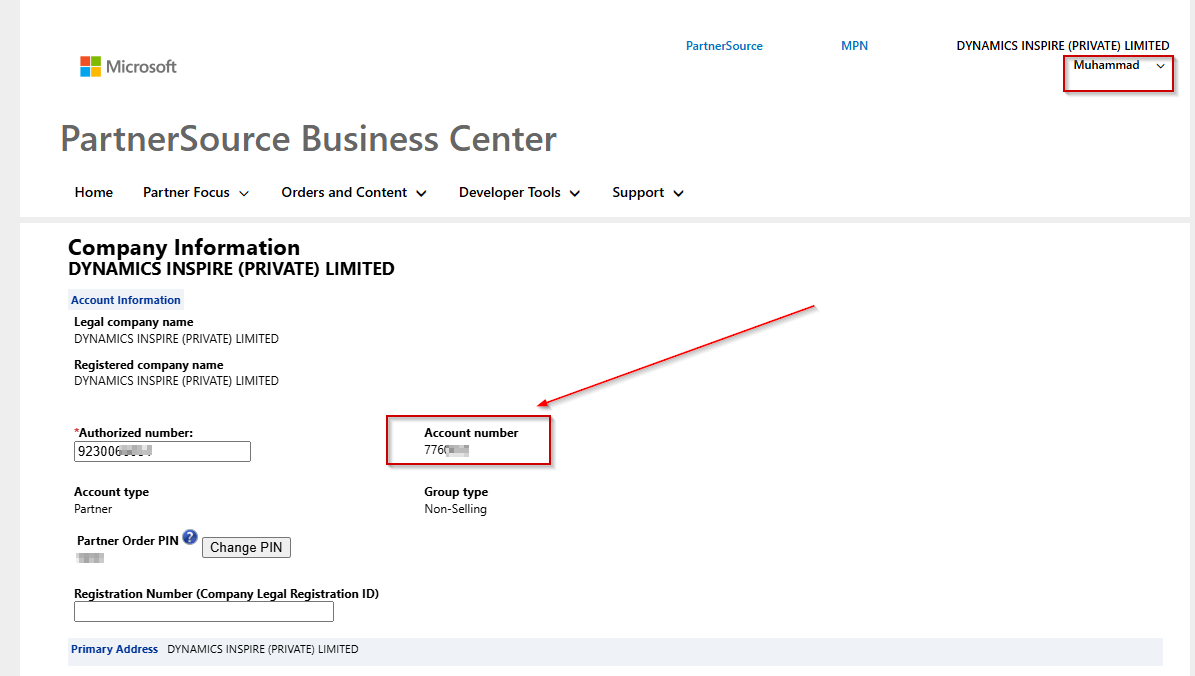
When you’re partnering with Continia or Lanham, they may ask you for your Microsoft PartnerSource Account Number so they can register your organization in their system and enable the relevant objects/modules in your Business Central development license.
This number is found inside PartnerSource Business Center (PSBC).
Step-by-step
- Open the PSBC portal link.
- Sign in using the Microsoft Partner user account that has access to PartnerSource Business Center.
- After login, go to the top-right corner and click your username/profile.
- From the menu, select Company Profile.
- In Company Profile, look for the field labeled “Account number”.
- That Account number is your Microsoft PartnerSource Account Number (the one Continia Lanham typically needs).
What Continia/Lanham Uses It For?
They use this PSBC Account number to identify your partner organization in their onboarding/licensing process—so they can add the relevant objects/modules to your development license setup.